Stories & Highlights Saver ↗
Instagram Stories disappear after 24 hours. iGram allows you to preserve valuable stories, announcements, and story highlight collections from public profiles before they expire forever.
Download Instagram videos, Reels, photos, stories, and carousel slides in original high-definition. Fast, private, and 100% free with no limits.
Follow our simple 3-step walkthrough to save any public Instagram post in seconds.
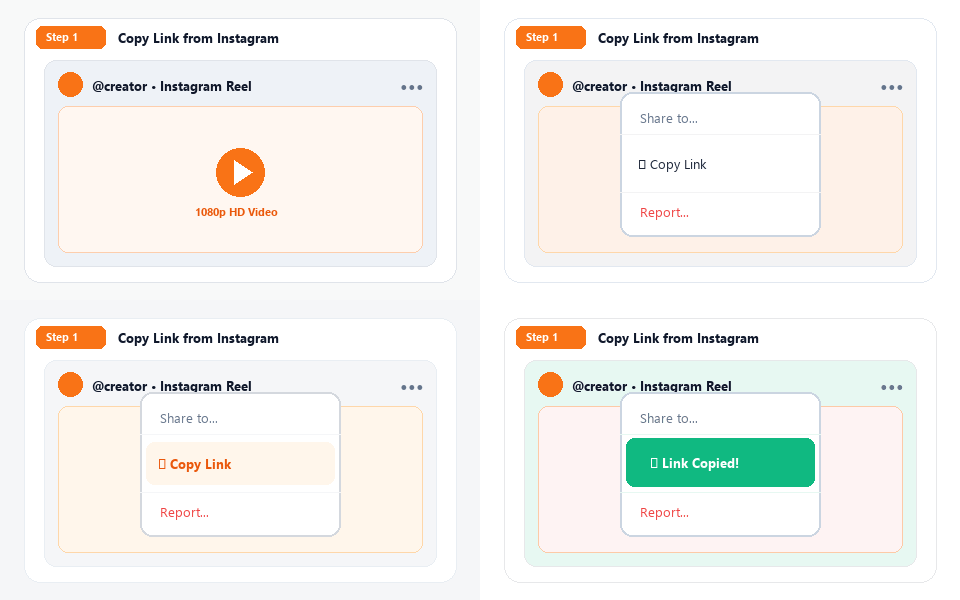
Open the Instagram app or website. Navigate to the Reel, video, photo, or story you wish to download. Tap the three-dot menu icon (•••) or the Share paper plane icon, then select "Copy Link".
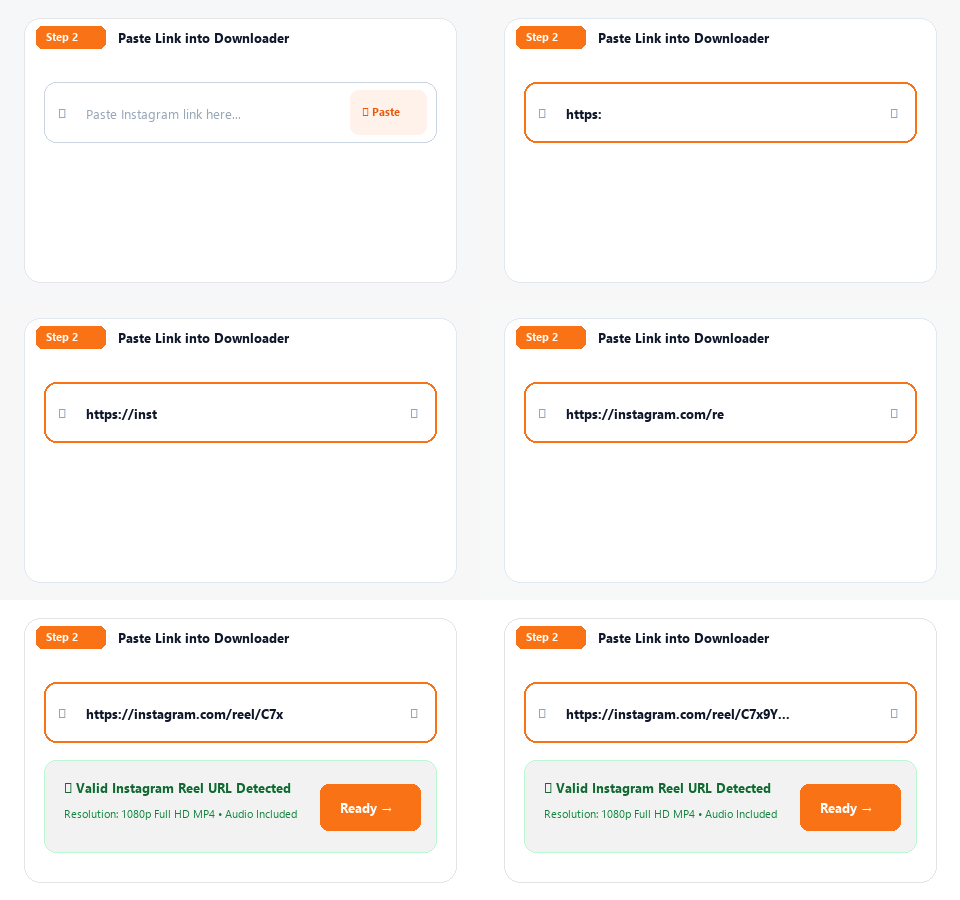
Return to this page and paste the link into the download input box above. You can also click our one-touch "Paste" button to insert the link directly from your clipboard.
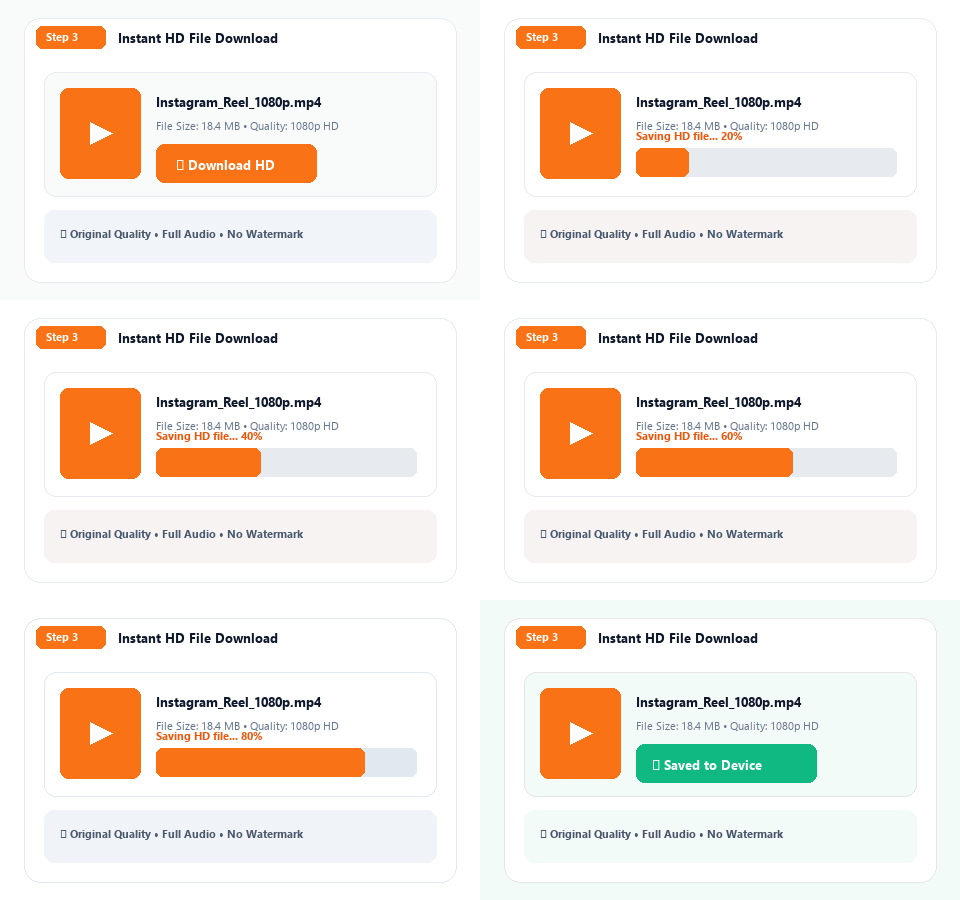
Click the Download button. The video or photo is fetched in original resolution without recompression. Save the file straight to your smartphone gallery, iPhone Files, or computer drive.
Direct download from source servers. Full 1080p HD, crisp frames, and original creator audio without compression.
Clean media files. No logos, platform stamps, or branding added to your downloaded videos and images.
Zero database storage. No account login, no cookies tracked, and creators are never notified of downloads.
Optimized backend routing ensures links resolve in less than 2 seconds with zero waiting queues.
Comprehensive support for every type of Instagram content.
Instagram Reels are the heart of vertical entertainment. With iGram, download trending 9:16 vertical videos in high definition with original creator audio included. Perfect for content creators saving creative inspiration, archiving their own clips, or viewing videos offline without mobile data.
Save any standard landscape, square, or portrait feed video post. Whether it's a culinary tutorial, interview, fitness workout, or product demo, iGram retrieves the maximum available bitrate with high audio fidelity.
Avoid blurry screenshots. Download authentic full-resolution photos directly from posts. When saving multi-slide carousel albums, our tool breaks down each slide so you can download individual photos and videos separately.
Instagram Stories disappear after 24 hours. iGram allows you to preserve valuable stories, announcements, and story highlight collections from public profiles before they expire forever.
A technical breakdown of Instagram's native aspect ratios and resolution limits.
| Content Type | Aspect Ratio | Native Resolution | Audio Bitrate | Saved Format |
|---|---|---|---|---|
| Instagram Reels | 9:16 (Vertical) | 1080 × 1920 px | 128 kbps AAC | MP4 |
| Square Feed Video | 1:1 (Square) | 1080 × 1080 px | 128 kbps AAC | MP4 |
| Portrait Video Post | 4:5 (Vertical) | 1080 × 1350 px | 128 kbps AAC | MP4 |
| Landscape Video Post | 16:9 (Horizontal) | 1920 × 1080 px | 128 kbps AAC | MP4 |
| Feed Photos & Carousels | 1:1 / 4:5 / 1.91:1 | Up to 1080 × 1350 px | N/A | JPG |
Zero installations. Works seamlessly wherever you have a modern browser.
Open Safari, go to iGram.pk ↗, paste your Instagram link, and click Download. Safari saves files into your Files app (Downloads). From there, open the file and tap the Share icon → "Save Video" to export straight to Photos.
Open Google Chrome or Samsung Internet, visit iGram.pk ↗, paste the link, and tap Download. The MP4 video or JPG photo downloads directly to your device Gallery or Downloads folder with immediate notification.
Use any web browser (Chrome, Edge, Safari, Firefox). Open iGram.pk ↗, copy the Instagram link from the browser bar, paste it in, and click Download to save the full HD file to your hard drive.
Everything you need to know about using NextGenArts iGram downloader.
iGram is a high-speed web utility created by NextGenArts that extracts public Instagram videos, Reels, photos, and stories in their authentic original HD quality (up to 1080p). It requires no software installation, no browser extensions, and no user registration.
Yes, iGram is 100% free with unlimited daily downloads. We do not enforce subscription paywalls, watermarks, or credit card requirements.
Yes. Every Instagram Reel downloaded through iGram includes its full, synchronized audio track encoded at high bitrate inside the MP4 container. Both original creator voiceovers and trending audio tracks are completely preserved.
On iOS devices using Safari, paste the link and click Download. Safari will prompt you to save the file into your "Files" app (Downloads folder). From the Files app, simply open the video, tap the iOS Share icon, and select "Save Video" to transfer it immediately into your Photos camera roll.
No. NextGenArts maintains a strict zero-retention privacy policy. We do not store videos, log user viewing histories, or track IP addresses. Files are delivered directly from Instagram CDN endpoints to your device.
No. To honor creator privacy and Instagram security protocols, iGram only processes content from public Instagram profiles. Posts, stories, or Reels from private accounts cannot be extracted.
Videos and Reels are saved as universal MP4 files (H.264 video with AAC audio) compatible with any video player, editing software, or device. Photos and carousel slides are saved as high-resolution JPEG files.
Downloading public Instagram content for personal offline viewing, research, or fair use archiving is widely permitted. However, you must always respect copyright laws: do not re-upload, sell, or commercialize other creators' work without their explicit written permission.
Experience fast, privacy-focused media downloading with NextGenArts Tools. Visit iGram.pk ↗ for the full-featured platform with 16 language translations, dedicated tools for every content type, and the fastest download speeds available.